Introducing Enkrypted Chat


Most messaging apps ask you to trust a company with your conversations. You sign up, hand over a phone number or email, install something new, and hope your messages stay private on someone else's servers. Enkrypted Chat takes a different path: send messages securely, with no cloud copy of your chats and no trace left on a central message store. Open a link in your browser, connect with someone you trust, and start talking—no installation, no registration, no tracking, and no ads.
If you have only seen the homepage, this article goes further. You will learn what Enkrypted Chat is, which everyday problems it tries to solve, what you can use today, how it works in plain language, and where the project is headed. Enkrypted Chat is the focused name and experience that grew out of earlier Decentralized Chat experiments—we kept the privacy goals and trimmed the research demos so the product is easier to understand and try.
Enkrypted Chat is experimental, unaudited, and still changing. Features may break, flows may shift, and things you try today might work differently next month. It is meant for testing, demos, and feedback—not for sensitive communications or production use yet. Group chat and some other core pieces are not reliable enough to depend on. If you explore the app, treat it as an early preview of an idea, not a replacement for the messaging tools you already trust for important conversations.
What is Enkrypted Chat?
Enkrypted Chat is a browser app that brings together three things people usually spread across separate products:
- Encrypted messaging — text, images, videos, and other attachments with someone you connect to directly.
- Files and documents — browse, preview, and edit supported files inside the app, with storage that stays on your side.
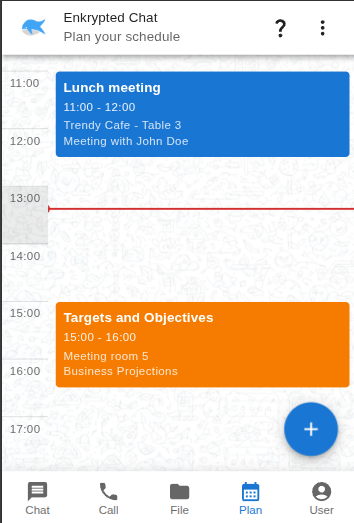
- Plan — a local calendar with day, week, and month views so you can manage your schedule without another account.
Think of it as more than a chat app: a private workspace in the browser that does not ask you to create an account or upload your life to a company's servers. Your keys and profile data are created on your device when you open the app. You choose who to connect with by sharing a link, QR code, or connection details—much like exchanging contact information, but designed so the conversation itself does not need to live on a central server.
You can try it now at enkrypted.chat.
Problems we are trying to solve
Privacy and convenience are often traded against each other. Enkrypted Chat is built around a simple question: what if you did not have to make that trade so sharply? Here is how that shows up in practice.
Your conversations should not live in a warehouse
Many apps store every message on company servers. Even when those messages are encrypted in transit, the architecture still centers on a place where data is collected, backed up, and potentially subject to policy changes, breaches, or legal pressure. Enkrypted Chat is designed so that when you and another person are connected, you are talking browser to browser—not routing everything through a permanent message warehouse that holds readable copies of your chats.
Getting started should not require an account
Sign-up flows create friction and identity trails: phone numbers, emails, recovery codes, and profiles tied to you across devices. Enkrypted Chat lets you open the link and connect. There is no registration step, no phone verification, and no central account database holding your identity. That makes it easier to try with someone you already trust—and harder for a platform to build a dossier on you simply because you wanted to send a message.
You can use it on mobile browsers too, though the experience may vary by device. The point is not perfection on every screen size on day one; it is removing the gatekeeper between you and a first conversation.
Files deserve the same respect as messages
Cloud drives are convenient, but they also mean trusting another company's storage with your documents, photos, and backups. Enkrypted Chat keeps files encrypted on your device before they are stored, with no server-side plaintext copy. By default, files live in private browser storage that persists across sessions but is not visible in your normal file manager. If you prefer files on disk, you can optionally mount a folder you control. The goal is one place for chat and files without silently uploading everything to the cloud.
You should not pay for "free" with ads and profiling
Enkrypted Chat does not run ads. The project also tries to keep metadata—information about who messaged whom and when—as small as practical. Features like typing indicators and read receipts can be useful, but they add overhead; the direction is to stay thoughtful about what is on by default. No ads and less metadata do not make an app magically secure, but they do change the incentives compared with surveillance-driven business models.
Another install should not be the price of privacy
Installing a new app on every device is a barrier—especially when you just want a quick, private conversation. Enkrypted Chat runs in a modern browser (Chrome, Firefox, or Edge). Open the site, allow camera and microphone if you want calls, and you are in. A more installable experience (for example as a progressive web app) is on the roadmap; for now, the browser is the main front door.
What you can do today
The following is what works now, with screenshots from the live app. For step-by-step instructions, see the guides for Chat, Calls, Files, and Plan; for a feature list and planned work, see Features.
Encrypted messaging
Both people need the app open in the browser. From there:
- Click Create new chat.
- Click Add peer.
- Exchange a connection link, QR code, or peer ID—however is easiest for you.
- When connected, open the chat and send messages and attachments.
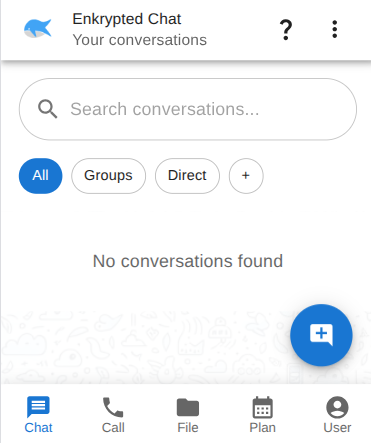
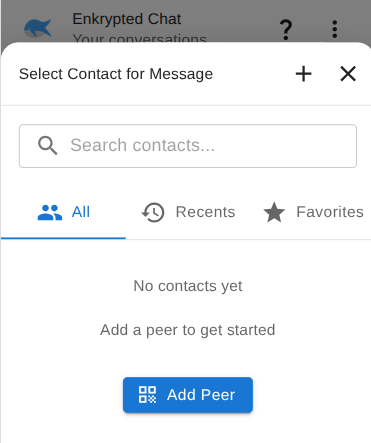
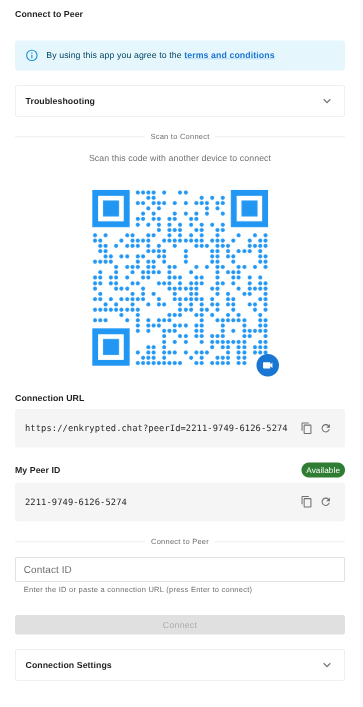
Messages are protected end to end over the direct connection. You can share text plus images, videos, and animations—the kinds of media people expect from a modern messenger, without uploading them to a central feed.
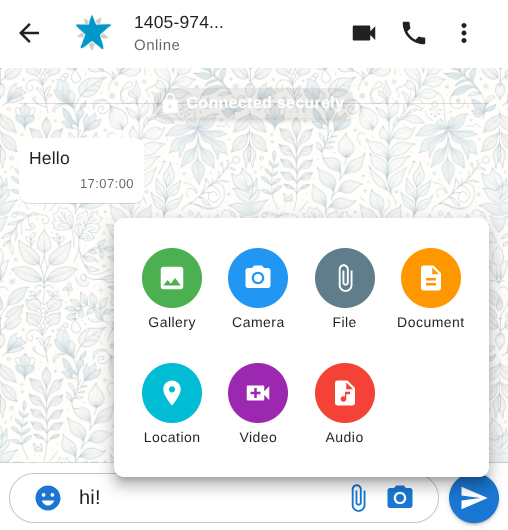
Voice and video calls use the same private connection model when you and your peer are set up for them. Allow camera and microphone access when the browser asks if you want to use calling features.
Files and documents
File management is built into the app—not a separate product you bolt on later.
Default storage keeps files in private browser storage. They persist when you come back to the app, but they do not show up in your operating system's file manager. That is a good fit if you want storage that stays inside the app and off the obvious paths on disk.
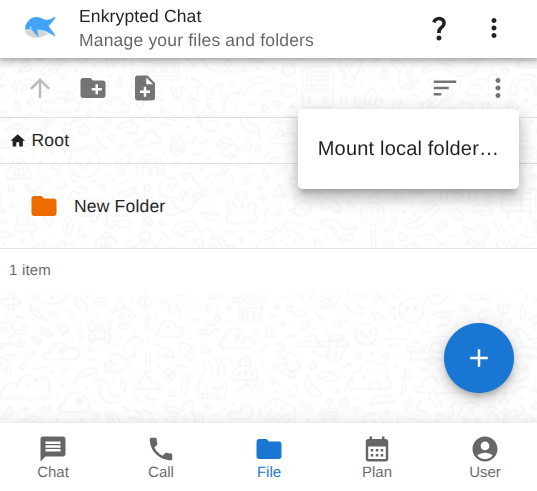
Optional folder mount lets you point the app at a folder on your computer (create an empty folder first, then grant access when prompted). Useful if you want files on disk while still working inside Enkrypted Chat.
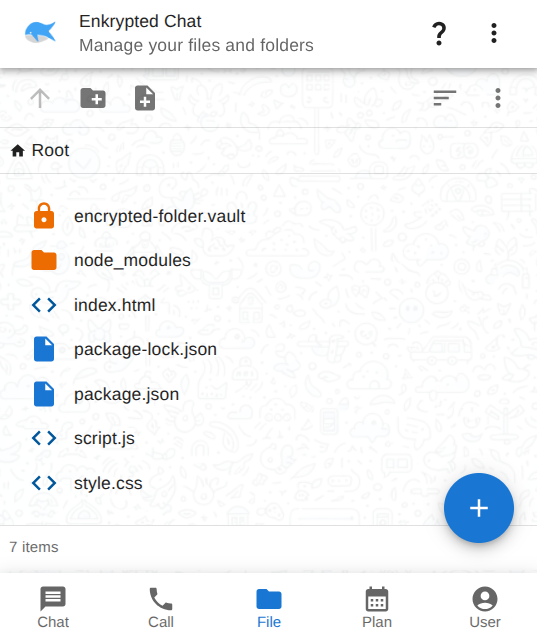
Open Files to browse and manage what you have—similar to a simple file manager. Supported types can be previewed in the browser; documents can be opened and edited in place.
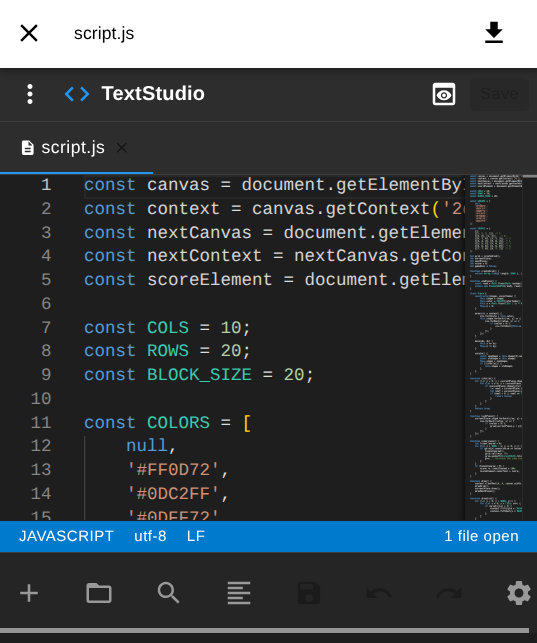
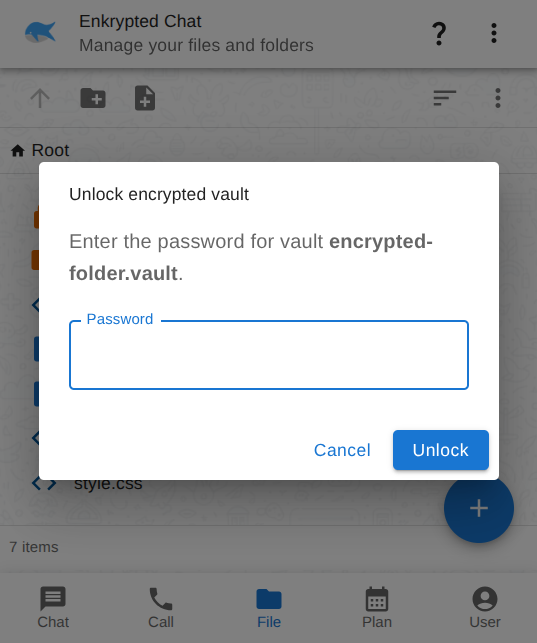
Files follow the same privacy model as messages: encrypted on your device before they are saved, without a server holding plaintext copies.
Plan your schedule
Open the Plan tab for day, week, and month views. Events are managed locally in the browser—another small piece of daily life you can keep without signing up for yet another service.
What is not ready yet
Be honest with yourself about limits: group messaging is not dependable, the app has not been professionally audited, and file or document features share the same experimental status as chat. The FAQ answers common questions; for architecture and roadmap detail, see the P2P Messaging Technical Breakdown.
What makes Enkrypted Chat different
Here is what we believe stands out—described without diving into protocol names or implementation detail.
You stay in control
Your connection identity and encryption keys are generated on your device when you use the app. There is no central authority holding a master key to your conversations. You decide who to connect with and when.
A direct line, not a copy room
When you message someone on Enkrypted Chat, the design goal is a direct link between your browser and theirs, not a pattern where every message is copied to a company server first. That changes the trust model: you are not asking a platform to promise they will never read, mine, or hand over your history.
Layered protection on the conversation
Think of it as more than one lock on what you send. The connection between browsers is already protected; the app adds another layer on top so that if one layer were ever weakened, others still apply. You do not need to understand how each lock works to benefit from the idea: defense in depth, not a single point of failure.
Old messages stay old—privately
Forward-looking privacy means that if something goes wrong with keys later, past messages do not automatically become readable just because of today's mistake. A new set of keys is used when you connect with someone new, and the system is built so compromising later keys does not unlock your entire history. That is the kind of protection people expect from serious secure messengers, expressed here in everyday terms.
Chat, files, and calendar in one place
Instead of a chat app plus a cloud drive plus a calendar subscription, Enkrypted Chat bundles messaging, files, and planning in one browser experience. Fewer accounts, fewer vendors, and a single place to experiment with a more self-directed way of working online.
Open the link and go
No installation ritual, no registration form, no waiting for verification codes. Decentralized encrypted messaging with no setup required is the promise on the landing page—and the workflow matches it: open enkrypted.chat, create a chat, share connection details with someone you trust, and start.
How it works (in everyday terms)
You do not need a cryptography degree to understand the shape of Enkrypted Chat. These metaphors capture the ideas; if you want engineering detail, skip to the technical breakdown later.
The post office vs a direct line
Imagine most messaging apps as a post office that keeps a copy of every letter in a central building. Even sealed envelopes pass through that building; the company operates the warehouse. Enkrypted Chat is closer to handing a sealed note directly to someone when you are both online—no permanent warehouse of your conversations sitting in between.
You  <---- sealed messages ---->  Friend
         (direct, when online)
Your keys live in your pocket
Encryption keys are like keys to a diary that only exist on your device. There is no master key at a company that can open everyone's diaries. When you open Enkrypted Chat, your device prepares what it needs; you are not logging into a server that holds the secrets to your chats.
A friendly introduction, not a permanent middleman
Sometimes two browsers need a brief introduction to find each other on the internet—like exchanging names at a crowded event so you can walk off and talk privately. A small, open-source connection helper can play that role: it helps set up the first handshake but does not store your message content. If a direct path is not possible, relay helpers may pass encrypted traffic along without saving it—but the design still avoids a central message store that keeps readable copies of everything you said.
Sealed storage at home
Files are like documents you lock in a drawer at home before you put them away. By default that drawer is inside the browser's private storage. If you mount a folder on your computer, it is more like choosing a filing cabinet you own while still using the same app to browse and edit. In both cases, the aim is: encrypted before rest, no plaintext pile on a remote server.
Meeting in person to exchange addresses
The most private way to connect is to swap a QR code or link offline—in person or over a channel you already trust—so nobody else needs to broker the introduction. That is optional but worth knowing: convenience and privacy trade off, and you get to choose.
Where we are headed
Enkrypted Chat is intentionally public about being early. That also means an active roadmap—here is what we are working toward, without fixed dates.
Coming next
- Support for more file types and smoother previews.
- Improved in-browser document editing and browser-based format conversions so you can do more without leaving the app.
- Progressive web app (PWA) support so the experience can feel more installable when you want that.
- Self-destructing messages for conversations where you want content to disappear after a time limit.
Further out
- Offline messaging through a self-hosted relay that can hold encrypted messages until you are back online—still without a central readable message store.
- Multi-device sync with a decentralized profile so conversations can continue across the devices you use.
- Group chat improvements so larger conversations become as trustworthy as one-to-one chat.
- Security audits when funding allows—professional review is the gold standard; until then, honest labeling and community feedback matter.
- A long-term vision for browsing folder structures on a remote device after files are exchanged over the direct connection—a decentralized, browser-based way to work with files across machines, inspired by what people like about self-hosted file tools but without the same server-centric shape.
We share this so you know the direction, not so you can mark a calendar. Things will move; priorities will shift; your feedback helps.
Some of these items depend on funding and time—security audits in particular are expensive, and the project is not monetized today. Progress will be incremental and visible in the open docs and app releases rather than in marketing timelines.
Built with AI—and built by a human
Transparency matters. AI is used openly across development, documentation, and problem-solving for this project. It speeds up iteration, helps explore alternatives, and drafts text that humans then shape—including parts of this article.
That does not mean the project runs on autopilot. Architecture choices, security tradeoffs, what ships and what waits, testing, and the time invested to get here are human work. AI is a collaborator that amplifies effort; it should not be read as a excuse for careless claims or as proof that no one is accountable. If something in the app or docs is wrong, the responsibility still lands with the people building Enkrypted Chat.
A final word
Enkrypted Chat exists because private communication should not require surrendering your data to a warehouse, creating yet another account, or installing yet another app before you can say hello. It is a browser-based experiment in encrypted messaging, local files, and planning—direct connections, keys on your device, and no ads.
It is also not finished. It is unaudited, unstable in places, and not ready to replace the tools you trust for your most sensitive conversations. If that honesty matches what you are looking for—something to try, test, and talk about—we would love to hear from you.